Showing posts with label Amiga. Show all posts

Friday, October 7, 2022

RetroChallenge 2022-10: The Map, a Spreadsheet, and a disk image...

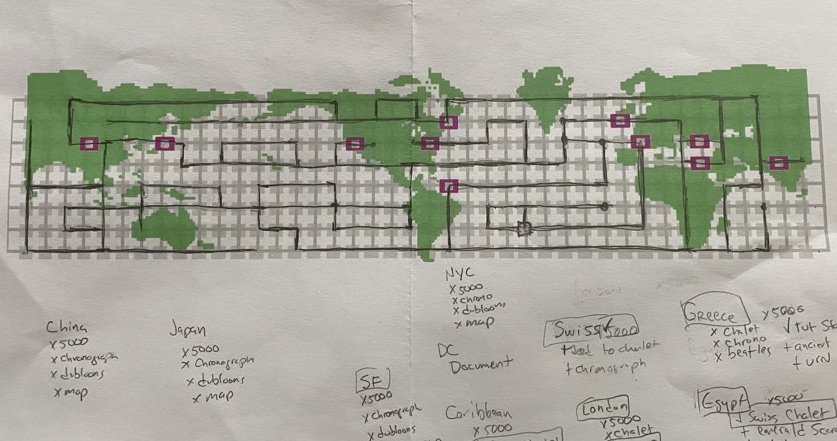
I now once again have a map to use!  The black circle in the Atlantic is the starting position.  The open circles are all of the locations you can visit. (China, Japan, San Francisco, Washington DC, New York City, The Caribbean, England, Switzerland, Greece, Egypt and India.)  The black lines are "preferred" ways to go, and the pink lines are unnecessary loops, dead ends, and game-ending branches of the maze

I started with a printout of the image from the previous post, and played the game a bunch just to explore the map.  I also started writing down what items you can get from which locations, which I've condensed down into a google sheet which is available as I work on it here. 


I checked it against maps online, and it seems to be 100% the same as those.  I really wanted to make the map entirely by myself rather than using one from the 'net.

Once I mapped it out the entire thing, I re-opened Photoshop and added a new map layer, and reduced down the map to only the segments that I should use in the game... eliminating dead ends, unnecessary loops, and places that will just end the game. 

Last night I also played a bit, streaming to my BleuLlama account on Twitch, which was my first time doing that too.  I learned a lot about how NOT to do it, and things to improve for the next time I play... I also need to figure out how to get it to record the stream for later viewing. 

One of the snagging points was that my disk image for C64 of the game was corrupted, so I also had to track down another copy that worked.   I think I'll prefer playing on the C64 because after the game is loaded, the transitions are much quicker than they are on the Amiga version.

Thursday, October 6, 2022

RetroChallenge 2022-10 : Hacker!

I've decided that for RetroChallenge 2022-10, I'm gonna finally win the game "Hacker" from Activision.  I will probably play it on an Amiga emulator on my modern laptop, perhaps streaming gameplay on my YouTube channel or my Twitch channel (which I've not set up yet.)  I'll send a tweet through on my twitter when I'm gonna stream or whatever.

The basic premise of "Hacker" game is that... well, you don't know when you start it up.  The only instructions included with it originally were "insert game disk, turn on computer"... that's it.  You have to figure things out, how to use the interface, everything, just by playing it.  I love this.  You have to navigate this robot around the earth, trading stuff from your inventory with various spies, to get all of the pieces of a shredded document.  Some spies will trade for multiple items and some spies will only trade for specific things, so you need to get it right.

"Hacker 2" had a similar concept, but it was controlling a robot inside of a building where you also had control of four video screens, four tape recorders, and a bunch of surveillance cameras to be bypassed.  It's a lot more complicated of a puzzle... for another time..

Anyway, I've loved the concept of this game since I first got it in the mid-80s for my Amiga. I got pretty far in it, but my map got thrown out or lost, and I never really returned to it.  So part of this will be recreating a map so that I can figure out where I am and how to get around in the maze of game... especially once the map disappears.

Additional update posts will be made here to this blogger thingy as I progress.

I'd like to solve it for the first time on my actual Amiga 1000 if possible, which is in storage/on display in my office right now, so I may need to do some quick restoration of it to get it running for this. ;D

I may also stream/do a run through of the game on C64 since I have that one set up and ready to go right now.

Hm.  It might be fun to solve it on every platform I have.  I also have an Apple IIc that's easy to set up... hmmm... :D

Saturday, November 9, 2019

RC2019-10 - A102 project - The end of the month of hacking


The short version is that I was super productive on these projects this past month.  I didn't complete it, but I never realistically thought I would be able to.  I lost a week's worth of time, or so, prepping our yearly Halloween Hack (blog post soon)... not to mention losing some time to work on building my Lego Saab 900... (blog post soon too).
One thing I will say, is that by combining the projects together, I tricked my brain into quite effectively "being okay with" working on one project or another, by them all being part of the same project.  So I would say that the month was quite successful.


So Anyway, I'm going to first go through a bunch of goals for the month, for the RC challenge, and in general, and briefly discuss my progress on them at a meta-level.  Then I'll get more into details about the actual work.

Overview and goals


Raspberry Pi / Emulation

I wanted to get the Pi 3 configured and booting right into an emulated  Amiga/Amibian environment.  I got the pi configured with standard raspian instead of Amibian, since I wanted this to be more of a general use machine.  It'd be nice to be able to use it for firmware development of the LL530 as well as the machine that it's targeted for.

So the target changed on this, but it is complete for now.

LL530 Development

I wanted to have the LL530 (USB Interface to Amiga serial keyboards, Amiga/Atari controllers and mice) fully finished.  Although I did not finish the firmware this month, I got more done on the project this month than I had in the past 6 months.  However, I was able to test the DIN pinout to discover that it's backwards, so I need to rev the board for those...

I didn't fully succeed, but I was successful.... if that makes any sense.

RC2014 Integration

I wanted to have an RC2014 Z80 computer built in as well, that I can connect to via serial port, for doing RC dev work without an emulator.  This aspect sadly got the least amount of attention.  I have an RC2014 mini installed, connected to the serial port on the Pi 3.  I've rewired the connection twice now, and I still cannot get it to connect using this wiring.

I spent time focusing on the other aspects.  So... 25% success.

Integration / Battery / Monitor / Enclosure

Most of the effort this past month was in this area.  I wanted to have the entire thing as a finished unit; to be able to be brought to a coffee shop, pull it out, turn it on and use it wirelessly. I can do all of these things right now with it.

So I would say this aspect was completely successful... although It does need improvements, particularly with the screen.


Installing The Linux

I started with a base Raspian image from their site.  I had the Pi hooked up to a HDMI monitor with USB keyboard and mouse.  After using Balena Etcher to get the image onto an SD card, I booted the  machine up.  I went through the basic setup, and updates.

I launched raspi-config from a terminal window, and went through to  enable ssh, i2c, and serial.

Next I installed some useful software packages:

apt-get install screen fs-uae-launcher stella

I made sure that serial was enabled  in /boot/config.txt,

enable_uart=1

I use screen as my quick and dirty way to connect to the RC2014 which is wired up to the uart on the raspi per the diagram above.  The reset line is wired to GPIO 4, so i use this shell script to "hit the reset button":

#!/usr/bin/python

import RPi.GPIO as GPIO
import time

print "Resetting the RC2014."

# setup GPIO4 as an output
GPIO.setmode(GPIO.BCM)
GPIO.setwarnings(False)
GPIO.setup(4,GPIO.OUT)

# send LOW (reset) for 1 second, then restore HIGH (normal run)
GPIO.output(4,GPIO.LOW)
time.sleep(1)
GPIO.output(4,GPIO.HIGH)

print "Done."
# return to high-z state
GPIO.setup(4,GPIO.IN)

The Red and Green LEDs are wired to GPIO18 and GPIO12, and I can run this script to do a nice fadey display on them:

#!/usr/bin/python

import RPi.GPIO as GPIO
import time

red = 18
green = 12

GPIO.setmode(GPIO.BCM)
GPIO.setup(red,GPIO.OUT)
GPIO.setup(green,GPIO.OUT)

r = GPIO.PWM(red, 100)  # channel=12 frequency=50Hz
g = GPIO.PWM(green, 100)  # channel=12 frequency=50Hz
r.start(0)
g.start(1)
try:
while 1:
for dc in range(0, 101, 5):
r.ChangeDutyCycle(dc)
g.ChangeDutyCycle(100-dc)
time.sleep(0.01)

r.ChangeDutyCycle( 100 )
g.ChangeDutyCycle( 0 )
time.sleep( 1 )

for dc in range(100, -1, -5):
r.ChangeDutyCycle(dc)
g.ChangeDutyCycle(100-dc)
time.sleep(0.01)

r.ChangeDutyCycle( 0 )
g.ChangeDutyCycle( 100 )
time.sleep( 1 )

except KeyboardInterrupt:
pass
r.stop()
g.stop()
GPIO.cleanup()

I may rewire these, or wire up additional LEDs to the ones specified with the Amibian/UAE led indicators, which are defined as GPIO4 for activity, GPIO16 for "Power", and GPIO16 for a clean shutdown button.

LCD Monitor


For a monitor, I'm using a $10 3.5" composite monitor.  I had to do a few things to get it to work however.

I had to hack the power input so that it would run off of 5v.  These are made to be used in cars, so they expect 12v of power.  At the time I did this, there were examples of doing this modification on
other displays, but not this model.  I powered it up using 12v, then probed the outputs in the power supply section for a 5v rail... and I soldered a 5V input there.

Once I had done this, I connected it to the 5v power in the enclosure, and hooked up the video input from the composite output on the Pi 3.

One snag I hit though, is that it wouldn't work right, It would flash on when the Pi booted, but it wouldn't show the desktop. Testing the Pi with HDMI or a known working composite input worked just fine though.

I was trying all sorts of things, and eventually decided upon trying PAL  video modes instead of NTSC, and that worked.  I spent some time tweaking the overscan settings as well, to stretch the screen to fit.  I also noticed that the contrast viewing range was substantially better on the top side of the display, so I ended up mounting it in the enclosure upside down, and I flip the video in the pi's config too.

So the changes that all this amounts to for /boot/config.txt are:

disable_overscan=1
display_rotate=2

overscan_left=0
overscan_right=0
overscan_top=5
overscan_bottom=5

sdtv_mode=2
sdtv_disable_colourburst=0

framebuffer_width=320
framebuffer_height=288

Although, as you can see from the screenshot above, it's basically unreadable.  So I was able to get it to work, but any future development on this will need to be with a different display.  Something with at least 480 rows, so that Amiga emulation can be reasonable on it.

Combining it all, and the Future...

I spent a few evenings rewiring that keyboard which mostly works really well.  I'm using a 5000mAh battery and get an undetermined-but-better-than-my-old-iBook amount of time with it.

The display is garbage.  I'm currently looking into replacing it with an HDMI-based 4" Waveshare IPS display with an 800x480 resolution for about $40.  Surely that will require moving around hardware inside of this enclosure, and since the display is meant to piggyback on the Pi, I will lose my integration board.

Obviously, I'll need to install the Amiga emulator, Tandy 102 emulator, my Model-T-Shell, and the Arduino IDE so that I can continue development on the LL530

In short, I'm super happy with where things are now, it just needs some tweaks to get it to be usable as a primary system. :D

Saturday, October 12, 2019

RC2019-10 Update 1: A102 Amiga/Tandy/RC2014 Frankenstein

The Enclosure

Since I had started working on this last year, the enclosure is partially completed.  I had removed some plastic ribbing prior to the RetroChallenge, and mounted both a Rasperry Pi 3 and a LL530 keyboard interface board inside of it.  That's about as far as I had gotten last year, so that's a good start. (pics in the next update post)

The Keyboard

I started out with trying to get the keyboard working.  This seems to be the most time consuming portion of the hardware at this point, and has the most question marks associated with it.
The big issue is using the Tandy 102 keyboard with a spare "two header" Amiga 500 keyboard "encoder" board.  I had toyed with the idea of perhaps just wiring up the row/columns to the Tandy keyboard's rows and columns, but this brought up some issues.  Obviously, the matrix would be different... ie; row 2 column 2 would be different keys on the two keybaords.  This would be fine as I could just change the code in the LL530 to convert the fakey-102-500 keycode to be the correct keypress.  I kinda wanted to use the LL530 stock though, so this meant rewiring the 102 keyboard.
The 102 keyboard has diodes at most of the junctions, and there were a different ratio of rows/columns. but I plan on ignoring those by cutting the traces on the board and wiring around them, ignoring them.


I measured resistance for each key on both keyboards.  The Tandy 102 keys ("Alps Mount Round Slider") came out at about 100 ohms when pressed.  The Amiga keys ("Mitsumi KPR Hybrid Switches") were 0 ohms (no resistance).  Could this be an issue with the custom Commodore key matrix scanner on the Amiga encoder board?  Only one way to find out... Wire it up!


I wired up a couple of the Alps keys to the scanner, hooked it up to my LL530 and tried it.  Turns out it all works great, so no worries there! I apparently picked "9" and the left spare key usually between 'left shift' and 'z', which apparently maps to a "section character" (§)


Next, I wanted to try to clean up the keys.  They seem to bind a little as you press them down, as the plastic tube is getting snagged in the mechanism. This is probably due to wear, dirt, etc.  I removed one from the board (four through-hole solder pins), and disassembled it carefully to see what I was dealing with.

The keys popped off using an official key cap removal tool... a pair of tweezers wedged under the key.  Then the plunger and dome could be removed from the enclosure by flexing out the two T shaped tabs on the enclosure top. From left to right: the key cap, top cover (snaps on using the two large T shaped tabs), round plunger, rubber dome with carbonized contact, and finally the enclosure with the contacts in the bottom.


As far as I know, all of the keys are contacting/switching okay, but if i need to replace components, they're easy to swap in or replace the entire key.


I also took this opportunity to replace the "caps lock" and "num lock" keys, which are latching, with two spare keys, since I wanted to reuse the Num key for "right Amiga" and the caps lock key needs to be momentary for the Amiga matrix scanner. The pin layouts were different, so i needed to drill new holes in the board for the momentary switches. The switch labelled "56" above is the replaced caps lock, while "57" is the control key next to it.

Four of the "top row" keys of the 102 keyboard, the arrow keys, don't have quite the right snap/click that the others do, due to 30 years of use and wear.  I happened to have a bunch of exact replacements, which I got on ebay for another project a couple years back, "12x12x7.3mm Tact Switches"


Next is the task of remapping the matrix.  I found some commonalities between the two matrices, seen color coded above... the keys in yellow share the same x/y indexing with the Amiga layout, and the other colors only share the same column.  I traced out the schematic on the keyboard, and cut a bunch of traces.  Next up is rewiring it and wiring it up to the Amiga Encoder board.

More to come....


Wednesday, October 2, 2019

RC2019-10 - The Globbing Of The Projects... Globjects?


Hey.  Long time no post.  How y'all doing?  I'm still here. I've gotten a lot of small things done over the past half year, and a lot of things almost done as well... and some long-standing projects not done too.  So, I've been almost productive...  Anyway, I hope to try something different this month for the RetroChallenge RC2019-10...  Let me explain...

The main projects I've been trying to work on recently are:


LL530 USB interface for Amiga serial keyboards and controllers

I've been poking at it a little over time, and am really damn close to getting the proper firmware done for it, but I just haven't finished it.  Which is stupid because I can actually sell these things once I'm ready!  I have keyboard working for all but my A1000 keyboards, and I have joystick/mouse/paddle working... but not at the same time in a way that I'd be proud of.  I also will eventually need to rev the board to fix three layout issues; a power/ground short, lack of ICSP programming header, and lack of pull-up resistor for VCS paddle sampling.


Llichen-80 Computer (LL80)

Okay, so it's not really a whole other completely new computer... but it is a specific configuration of the RC2014 Z80 computer.  It started out this year as a whole lot of customizations to standard (but old, obsoleted) RC2014 boards to add bank switching, using the 8 bit parallel IO board (the one with all the LEDs and switches!).   Now, I reworked the idea so that I just use the standard "Switching ROM" board and the "64k RAM" board.  That simplifies the design; making it easier to get to the LL80 spec, since just using those two cards replaces two RAM boards, one ROM board, and one IO board... plus no modifications to any of the boards are necessary.

The other part of the LL80 computer is the "LLSuper" board.  This is an arduino-based supervisor of sorts that sits on the serial console port.  It acts as your usb-serial interface for when you use a desktop computer as a console.  This board used a CH376S USB Drive interface to access any flash drive as mass storage (it's a neat part.. like $2 for a board with a USB A port... it talks TTLRS232, SPI or parallel, and handles all of the disk switching, FAT filesystem etc. So there's very little overhead on a tiny ATmega micro.  I also have an I2C based clock chip board for this.  This sits between your console and the RC, and lets you have a kind of shell access to the disk from the console, as well as from the RC.  The RC side of things also got direct access to virtual disk image files with a sector-based interface, as well as direct fileio...

The next steps would have been to write a CPM BIOS and make the thing boot into that.

But I've come to realize that even the LLSuper board is unnecessary.  I can accomplish near-similar things using the standard  "Pi Serial Console" board.  If i use a RasPi Zero, and boot linux on it (or adapt the code in the PiGFX kernel, I can put in my serial-disk IO stuff, for cheaper, without needing to fab up my own board.  I started to mess around with this using my new RC2014 Micro, a Pi Zero, and a slight hack to attach the reset line of the RC to a GPIO of the Pi, so i can now reset the RC from the Pi.

I do have the protocol all worked out for the serial interface using unused ANSI escape codes, which are made for custom purposes like this.

A102 - Portable Emulated Amiga in a Tandy 102 shell

This is one i've wanted to work on since last year. I was trying to get it done before Rochester MakerFaire last November, but burned out on it.  It essentially is a project that joins together a bunch of parts... all of which I have:

  • Raspberry Pi 3, with Amibian... booting right into an emulated Amiga environment
  • Tandy 102 shell, rescued from some unrepairable 102's
  • Tandy 102 keyboard, also rescued (keys bind as they're pressed though)
  • Amiga 500 keyboard interface board, from a long-gone computer
  • My LL530 USB serial keyboard interface board
  • Amiga mouse
  • 3.5" composite LCD panel (new, $10 online!)
  • large Power Bank battery pack
This project entailed hacking the keyboard (removing the wiring/traces on the board) to convert the scan matrix to match an Amiga 500 keyboard.  This gets connected to the LL530, which is plugged into the Pi.  All of it gets jammed into the 102 shell, and becomes a portable computer. 

I waffled a bit on this... mainly because the keyboard stuff would be a chore.  I want to remove every key, and clean their travel tubes, to eliminate the keys binding.  Wiping out the traces and rewiring the board seems like it's going to be a tedious process... So i kept thinking that maybe I should make a cherry-mx switch based board to fit the keyboard space instead... and... yeah... i just kept going down that same path of "maybe i should do this other thing" instead... instead of actually moving forward on any of it.

I also pondered putting the entire Llichen 80 computer into this shell... which brings us to...

RC2019-10!

So that's where RC2019-10 comes in.  Why almost fail at three projects when I can almost fail at ONE project! Seems a lot more efficient!

The end result for this month will be to have a working portable laptop computer that runs Amibian (Linux), RC2014 (via serial connection to the Pi) and general Linuxy stuff.

Or, more granularly, here are the tasks as I see them now: (in no particular order)

  • Finish the Keyboard + Joystick/Mouse firmware for the LL530
  • remove the wires on the 102 keyboard PCB
  • clean the travel tubes on the keyboard
  • rewire the keyboard to match the Amiga's matrix
  • Wire the keyboard to the Amiga 500 interface board
  • Connect the RC2014 Micro via the Pi's serial interface pins
  • Additional buttons on the device to cleanly shut it all down
  • Have it all powered from a 5V/USB powerbank mounted internally
  • Serial-console textmode app for Linux that provides the beginnings of a backchannel to 
Stretch goals:
  • Full drive interface for the RC2014
  • CP/M BIOS for the RC2014 that uses the serial protocol
  • Fit the RC2014 Mini + 64k RAM + switching ROM + TMS9918A cards inside the case
  • Have the video switchable between the Pi and the TMS9918A video card

Not sure how far i'll get, but it globs together all of the recent projects in a way that I won't feel like I'm neglecting one project by working on the others... since they're all the same project now. :D

Saturday, June 2, 2018

Finishing touches on LL530 v1.00 firmware

I'm currently cramming to get the first version of the firmware for my LL530 project out, so I can ship the first few ordered boards. (YAY!).

Quick backstory...

LL530 is a board with an Atmega32u4 (Arduino Leonardo/Pro Micro) and a few connectors on it so that you have a USB interface for Amiga/Atari ST/Atari mice, Atari controllers, and Amiga 500, 1000, 2000, 3000 keyboards.  Yes it even supports weird Atari controllers like Basic Programming's "Keyboard Controller" and Star Raiders' Video Touchpad, as well as the Indy 500 "Driving" controller that they made look identical to Paddles,... which are also supported.

Yes, there are other versions of portions of this, but I wanted more flexibility. I want to be able to just connect to the device, tell it that i have a mouse plugged in now, and it will just work... and in the future, auto-configuring the ports without even connecting... but i digress...

Yeah. I wrote a program in VCS Basic Programming via the Stella
emulator on my Mac.  Yeah. it's as cumbersome as it looks, but I'm
still freaking impressed that BASIC is even possible... it means only
one thing.. Warren Robinett is a god among men!
I'm getting off the subject here... okay...


Hey, Scott... don't forget the reason for this post...

Oh right.. Thank you Document McSubheading for reminding me.


No Prob..... now get on with it!

RIGHT.  So I'm trying to get all of the non-keyboard stuff working in one firmware.  I have a decent shell interface that lets you do all sorts of configuration stuff of the two ports, which I call "Port A" and "Port B".  I have a framework where you can pick the input device (joystick, mouse, paddle, etc) and then pick what it sends out to the host computer (mouse movements, joystick movements, various keyboard configurations.)

Now, the Arduino framework is kind of notorious for being slow in some respects.  That's the price you pay for ease of use.  One of the slowest is the port pin reads and writes.  For example:

digitalWrite( Pin3, HIGH )

 is a function that sets Arduino Digital Pin 3 as a HIGH value.  So internally, it looks at "Pin3", and figures out where on the ATmega microprocessor that maps to... The digital/analog pins from the Arduino are abstractions of the ATmega's actual ports.  for example digital pin 3 might actually be "PORTD" bit 5.  This function makes it so that beginners don't need to know that stuff... and what's more, all arduinos have digital pins 0, 1,2, 3, etc but generally map to different ATmega ports/pins... it might be PORTD bit 5 on a 328P, but it might be PORTG bit2 on a 32u4.  

Too much info.  TL;DR: digitalWrite() digitalRead() are an order of magnitude slower than just reading PORTG and masking off bit 2, which is near instantaneous.  (I should note that analog reads are slow, regardless, as the micro needs time to make the reading.)

I noticed this on the Eastman Theater sign project. I was using digitalWrite() calls to bit-bang out the data to the sign's shift register/LED drivers.  I was getting roughly 5 frames per second, when driving all 240 columns of 8 pixels...  When I switched it to direct bit writes, it went well over 60 FPS!

Mouse support....

I have all of the other controllers working, at least somewhat, and I've had a USB-Mouse interface using a 32u4/Pro Micro on my RaspberryPi/Amibian system for years now, so I knew it would work... but i was surprised when I finally got to working on the mouse device reading to find it wasn't working.  It was getting readings, but it was missing some... it was missing a lot of them.

To read a joystick, you only need to know "is it up now?"  "is it left now?"... not very time critical between readings.  However, for reading a mouse, you need to read all of the "gray code" sequence state numbers that it generates.  As it rotates left-right (the up-down axis is identical), it sends out, over two bits of the connector, a sequence of digits.

00 ⇨ 01 ⇨ 11 ⇨ 10 ⇨ 00 ⇨ 01 ⇨ 11 ⇨ ....etc
Moving left

00 ⇨ 10 ⇨ 11 ⇨ 01 ⇨ 00 ⇨ 10 ⇨ 11 ⇨ ....etc
Moving right

The mouse generates these regardless of you reading them. 

There was some slowdown in reading the mouse, so i was missing some of the readings... so instead of getting 00, 01, 11, 10, 00, 01, 11, ... I was reading 00, ... 11, 10, 00, .. 11, .. .. 01, ... 00,  which generated bad mouse movements, since those are sometimes recognized as left, sometimes as right, sometimes as completely invalid changes.

So it must've been the port reading?  Right?  That was my first thought too.  This thought was cemented further, when I tried out some stripped down firmware, which worked, but once i read from all three possible buttons, it would fail again.  I thought maybe the arduino framework was doing an analog read on one of those ports or something. I wrote some code to profile read/write times, and found that it was just as fast as expected.  (I had switched the port IO for this project to direct reads, without the framework long ago.)  (sidenote: Still not sure why commenting out button 3 had any affect... weird.)

So that wasn't it.

I eventually moved some simple mouse reading/generation code as a dedicated loop, which worked.. 

Next, I re-enabled my big switch statement that checks the input types, and checks the output types and does the right thing... to my surprise, it still worked.

I re-enabled some of the other polling routines... some are timing based, so they use the millis() function which of course has some overhead... and surprisingly, everything still worked.

Then I re-enabled the serial shell interface... and things broke... quickly!

But... the serial interface wasn't doing ANYTHING?!  what?!  All it's doing is first doing a
if( !Serial ) return;
The 32u4/Leonardo/Pro Micro will have major issues if you try to send out Serial data before it's done initializing that HID device.  This call just checks to see if the port is active.. I littered my code with them before Serial.print() blocks to prevent the thing from bricking again...  But even when the shell is active, i do a standard
if( Serial.available()) { .... }
to check if the user typed anything... then it pretty much returns...

The problem is... my assumptions were WRONG.

I threw some of these calls into my profiler, which is basically this kind of thing
startTime = millis();for( x=0 ; x<1000 ; x++ ) {    /* do the thing to test in here */}endTime = millis();
then it prints out (endTime - startTime)/1000, and you get the average time per loop.


if( Serial.available() ) { /* do nothing */ }

This took roughly 0ms per loop, so it's probably just checking a bit inernally...


if( !Serial ) { /* do nothing */ }
I thought this did the same sort of thing... Nope.  No matter what I did, 10ms.  Every time this is called, it blocks for 10ms.  No wonder that my mouse polling was failing! it was missing tons of gray code sequence states since the thing was almost constantly blocking in the "!Serial" check.

BLAGH!

It's feeling better now. :D


Anyway... Here's some more info on the project in general:

Links for the project are in flux right now; once I get the first version of the firmware packaged up, i'll be setting up a proper website/hub for it with full documentation of the project.  Until then, here are some links:


Testing the system is kinda fun!  Although that 7800 controller is pretty horrible.

Monday, May 1, 2017

RC2017/4 Final! (Replica Results and Post-Mortem)

"The Treachery Of Pop Pixel Art" - Scott Lawrence, 4/30/17
Inspired by Andy Warhol and René Magritte's works
As you might know, I spent time this past month working on what I nicknamed "The Andy Project". The idea was to re-create some of Andy Warhol's art pieces on an Amiga, well, an emulated Amiga, using appropriate tools, as pixel-accurately as possible.

This blog post will be a summary of results, mentions of pitfalls, and that kind of thing.  The previous three blog posts cover most of the other information for the project.  Links for these are on the bottom of this post.

Philosophical musings...

Andy's work is interesting because you don't see any other of the "classic" artists doing their work in such a media, where you can get pixel-for-pixel copies of the originals.  Nowadays, sure, you get photographs of the original, but with these digital art works, you can get essentially the EXACT same content that was originally produced. This is likely why the "originals" have never been made public directly... Understandably so.... That floppy gets out, and we see posters of pop-pixel-art available in every mall. That said, I want to make poster blow-ups of some of these. ;)

This actually got me thinking a lot about the resulting media files that I will be produced.  These will be virtually indistinguishable from the originals.  Are they the same as the originals?  In some of these, I am the person who drew all of the individual pixels in Deluxe Paint.  It is distinctly not the original files, which are still under lock-and-key.  But those may surface, and you may find that mine are nearly identical with respect to which color pixels are where on the digital canvas.

In the music industry, if you were to make a copy of a waveform, by looking at numerical representations of the wave, and typing them in to a computer, making a replica of the original waveform.  When played back, it's still Debbie Harry's "Rush Rush"... but you actually created it from scratch by copying the numbers from the original.  It's a replica... that is functionally and actually identical to the original.  In fact, if you were to write a computer program that did this for you; go through the audio file, and look at the numbers, then write those numbers into another file... then the computer has generated a replica of the original... That's exactly the same as I'm doing here, right?

That software already exists.. it's "cp", "copy" or "drag-and-drop the icon to another folder."

Does that mean that I cannot take credit for my reproductions?  This is kind of why I had wanted to add specific mistakes/changes to mine, so even if you were to compare them at the pixel level, mine would be at the least, a derivative work. ... but is that enough?  Couldn't Andy's estate come after me and say "that imagery is exactly the same as the original, and you're putting it up online for free! Stop that now!"

I know that mine are replicas...  perhaps that's enough.

But then, if you think about the pop-art movement of the '50s and onward, it delves DIRECTLY into this, head on.  Andy, for example, took iconic things (soup cans, Marilyn Monroe) and used them as the basis for his iconic works.  If the Campbell's Soup can looked different, so would have his artwork.

So in that vein... My reproductions are essentially my brand new art pieces, just using his pieces as the inspiration...

Wait.. are mine replicas of his works?  Are mine new works, like the originals under the pop-art umbrella?

I don't know how to resolve this.

The Andy Project

I started out with a list of 11 images to pick from.  I thought I might get a few done, but I never set specific goals for myself... so I only got three of them done.  I still feel like this is a major success. Mainly because I can now do many of the other ones at my leisure using all of the tools and frameworks I've already set in place, with full knowledge of the pitfalls for the various steps.

I also created two pieces that I was inspired to make from the project, so I included those in the ZIP and slideshow ADF as well.  Links to the slideshow ADF downloads are at the bottom of this blog post, along with an in-browser emulator that can play it in-browser.

Everything provided here is to be considered to be Creative-Commons BY-NC-SA. (Attribution, Non-Commercial, Share-Alike).

What went wrong

I think the big thing that went wrong was wrangling with tools. There are two instances that come to mind.
Nothing really went wrong here, I just thought it would almost
be appropriate for this to be my end-state of this image. :)
I feel like Andy might have accepted this.

ObeseBits

First of all, my tool "ObeseBits" was giving me trouble.  It's the first Javascript-Processing app I've ever really made.  Most of the time for Processing, I just use Java mode.  That seemed a bit excessive, and I wanted to make something I could easily share, so I went Javascript instead. 

If you watch the time lapse, you may see bits like this roll through.
The frustration was real.
This is a fine choice, but I had a problem where... I'm not exactly sure what was going wrong, but I was re-drawing the entire screen every frame.  It seemed to be chewing on more RAM that it should, especially after it sits for 5 minutes... especially running in Chrome on a 8 year old mac with 2 gig of RAM.  Yes, I see the irony here that I'm creating these images on a machine that could do this with 1/2 megabyte of memory... hehe  Anyway, it would get so unresponsive that it would essentially lock up the machine, but it always seemed like it was JUST ABOUT TO wake up.  But no... spinny rainbow pizza instead...  Force reboots were my friends.

FS-UAE emulator

The other main issue was that I couldn't get the ADF file exported from the emulator I was working in!  Seems like a pretty straightforward thing to do:

  1. Mount an ADF disk image
  2. Diskcopy Amiga Workbench 1.3 to it
  3. Make space by removing printer drivers, fonts, utilities, etc that aren't needed
  4. Copy my "Files" folder from the virtual hard disk to the virtual floppy
  5. Set the startup-sequence to just add disk buffers and then run the slideshow (DPShow)
  6. Quit out of the emulator
  7. The ADF disk image file you have there has all of the above done to it, right?
            RIGHT?

WRONG
.  I was using FS-UAE that, because of reasons that kinda make sense, treats all mounted ADF disk images as read-only, and creates an "overlay" in a separate directory with all of your changes.  So... here's the list of things I tried to get the modified ADF out of the thing:

  1. "apply" the changes to the ADF.
    • Can't do this.  The change overlay is in a custom format.
    • No tools exist to do this. (!!s)
  2. Turn on the UAE emulator flag "writable_floppy_iamges=1", which tells the emulator that it's okay to write directly to disk images for new disks.
    • Then you must mount a new disk, once this is set, diskcopy the content over, and you'll end up with an ADF with all of these changes. Right?
    • WRONG. FS-UAE ignores this flag.  There is literally NO WAY to write to an ADF that I have found directly from FS-UAE.  (let it be noted: otherwise, FS-UAE is freaking awesome.  this just really frustrated me.)
  3. At some point in here, I needed to edit the startup-sequence on the ADF, and I couldn't do it via the emulator's mounted-folder-as-disk-image, so i grabbed "Vim" from Fred Fish disk 591.
    • This required ARP for some reason, so I grabbed ARP and ran the installer.  
    • It replaced a bunch of AmigaDOS commands, added a library, etc.
    • Vi now worked.  Yay!
  4. Make a disk image to a file within the emulated Amiga.
    • Sounds ridiculous, but in fact, yes... it is ridiculous.
    • The only one I found that "should" work in AmigaDOS 1.3 was "TransADF"
      • Grabbed TransADF off Aminet, put it on my "Work13" disk (which is a mounted folder from my Mac). 
      • Ran TransADF, and... GURU MEDITATION
    • Fumbled for a while and realized I could boot an emulated AmigaDOS 3.1 system.
    • Booted up AmigaDOS 3.1, ran TransDisk, created the ADF, looked good.
    • Booted back into 1.3, and suddenly, on "loadwb", the system just locked up with a blank blue screen.
    • Eventually traced it back to ARP being an issue.
    • Luckily, my Work13: disk was being maintained by Git, so i just reverted the changes that the ARP installer did... and now it all worked again.  blerg.
So yeah.  Cumbersome as all get out, but I managed to get the ADF made, and I now know I can just boot into 3.1 and run TransDisk to do this again.

What went right...

I got three image replicas done! YAY!

I feel super proud of the fact that I was able to do it to the best of my abilities, to the best effort I could provide and do.  I tried my best to be pixel-perfect, to be color-accurate, and I think the results paid off really well!

You can see me work on these in a time-lapse on YouTube too!

What you see here are EXACTLY what I was doing this project to avoid.  Incorrect aspect ratio, wrong file format, etc. ;)  But they show the effort. I  left the Deluxe Paint panels up just for fun, and to show that these are in fact the ones that I made, and not the source Warhol material.  If you want the proper files, they're downloadable at the bottom of this file.

"campbells.pic" (As seen in Deluxe Paint III)
Original by Andy Warhol, Replica by Scott Lawrence

"Campbells" took full advantage of the foray into GraphiCraft, as I used the palette generated from the saved out Graphicraft 1.2 image, but then tweaked by hand to accurately match the pre-release palette that Andy would have had available to him.  I feel like this is a great representative pice of his work on the Amiga, as well as for this project itself.
"venus" (As seen in Deluxe Paint III)
Original by Andy Warhol, Replica by Scott Lawrence

I had originally thought that "venus" was going to be pretty simple. It was mostly the "venus.iff" file that is included with every copy of Deluxe Paint.  (Here's a link to the original as seen in Deluxe Paint IV.) Well, there's those two orange dots on the left, the scribble on one eye, and the third eye... so it should be easy.  Right?  Nope.  

  1. The source material that I had was a JPEG, with its entire color palette completely wonky.  Browns looked violet... whites looked yellow... that kind of thing
  2. This means that I had to spend time not just picking the right color, but also cross-referencing the pixel in the jpeg with another of the same wrong color, but unchanged by andy... then find THAT color in my DPaint version, and use that color.  
  3. The forehead.  I don't know how... I don't know why, but Andy replaced MOST of the forehead with the version that's there... He probably just grabbed a brush and pasted it down a lot. There's some evidence of this being the case along the left side. Perhaps I'll analyze it more for another blog post in the future.  I ended up having to wipe out the entire forehead and re-do it entirely.
I do feel it necessary to note that many of the pixels in this are "close".. not specifically the exact correct shade of the colors.  There are a lot of orange/browns that are VERY similar and with the process of cross-referencing mentioned above, I know that I made a few mistakes here and there on this one.

I had felt a bit uneasy looking at this one for a while, but couldn't place exactly why... but it turned out that the forehead's replacement was a huge subconscious "something's not right here" flag in my head that I couldn't quite place. 
"flower" (As seen in Deluxe Paint III)
Original by Andy Warhol, Replica by Scott Lawrence

This one looked like it was going to be fairly straightforward to make... and it in fact was!  There were a lot of stepped lines, and the source material was scaled up and fuzzy, but I was able to work around this.  I remembered that DPaint has a tool "Coords" (press | to enable) which shows where your cursor is in X and Y, and also length of lines you're drawing.  This took was invaluable for doing this replica.

Notes...

Yes, I did notice that "Flower" and "Campbells" are missing the red rectangles in the upper right of the imagery on the provided ZIP and ADF files below..  Those are the screen raise/lower tools from AmigaDOS shining through.  Much like the "GraphiCraft" drag bar being visible, those should also have been visible. That's my mistake. The next version I cut of the slideshow will have that fixed.

Oops!

Links!

Here's a list of links of products and stuff that may be interesting:
Everything provided here is to be considered to be Creative-Commons BY-NC-SA. (Attribution, Non-Commercial, Share-Alike). 

And previous blog posts about the topic:

Monday, April 17, 2017

RC2017/4 Update: The Andy Project - Tools

Just an update to show some progress on the project.

This project is to reproduce a near-pixel-perfect reproduction of a few of Andy Warhol's pieces that he created on the Amiga 1000 back in the 1985 timeframe, on native tools.

We're 12 days in, and I do not have any completed images to show y'all.  But don't be fooled into thinking I haven't done anything!  I've been running a timelapse of the entire process, and here's the segment for the tool setup work:


Here's a summary of the tasks done so far, and the direction I'm going.

Graphic editor tools

First of all I did a kind of survey of a few tools to figure out what would work best.  I had originally thought that I would use the pre-release GraphiCraft to generate the files, however I ran into a few snags.  This software crashes.  A lot.  More importantly, it does not  have the "save" function implemented.  It DOES however have something very important... Andy's works used some of the pattern flood fills that GraphiCraft (nee ProPaint) used.  These were removed before GraphiCraft was actually released.  But I'm getting ahead of myself here.  My feeling is that with this project, GraphiCraft will only be used to generate more sample and reference materials.  Mainly the fill patterns and how they are aligned, as well as the color palette, which seems to be untouched for many of Andy's pieces.

I have three versions of GraphiCraft here.  I have a pre-release version on a "v29 DOS" disk.  This is the one with patterns, correct palette, is unstable, and cannot save.  I also have two disks labelled "GraphiCraft 1.1" and "GraphiCraft 1.2".  As far as I can tell, the applications are the same, but one is on a Workbench 1.1 bootable disk, while the other is on a Workbench 1.2 bootable disk.  For some starting points of GraphiCraft images, I'll use this to generate the file, and perhaps I'll use them as the final save step, so that we get GraphiCraft /ProPaint ILBM files instead of DPaint ILBM files.

I have also settled on Deluxe Paint III for the main amount of the work.  1 and 2 are fine, but 3 just feels more stable and complete, at least with my 30+ years of experience with the Deluxe Paints... Deluxes Paint?  hmm.  DPaint 4 would work as well, but I've never really gotten completely used to/comfortable with it.

Slideshow tool

I also looked around a bit for a slideshow application.  I want the end product to be a bootable ADF that can be dropped onto a 1.3 system, or perhaps on an AROS-replacement-kick system. I wanted to use a program where I could just script it easily, without having to fire up a gui to add in or replace files.  So tools that were out included AmigaVision (2.x+), Deluxe Video (needs gui to make slides, palette limited anyway), and so on.
Early on, I was considering the "Slideshow" application that came with the "Deluxe Paint Art and Utilities" disk from Electronic Arts. I've used it quite a bit in the past, and it has exactly the type of "script it in a text file" interface that I want. However that one seems to not function on anything newer than AmigaDOS 1.1.  There is an updated version of this on the "Impressionists" art disk also from Electronic Arts, but that one did not work with 1.3 either.

Anyway, this is the exact feature list I want, in bullet form:

  • Must run in AmigaDOS 1.3
  • Fade in/out to black
  • supports10-15 slides
  • supports 320x200 32 color IFF-ILBM image files
  • delay time while a slide is up
  • (optional) user input to advance to next slide
  • (optional) user input to exit from the slideshow
  • should not require loading a GUI to add files, tweak sequence


Here's a quick summary of some of the tools I've experimented with, and my thoughts.  Some of them are from commercial products, some from Fred Fish disks, etc.
First: these were not suitable:

  • EA Slideshow (DPaint Arts & Utilites Disk) - requires AmigaDOS 1.1
  • EA Slideshow (The Impresisonists) - requires AmigaDOS 1.1
  • EA Deluxe Video - requires gui editing to edit/tweak slideshow, 16 color images
  • AmigaVision - requires gui editing, AmigaDOS 2.x+
  • PPShow - Don't remember why. ;) I think it was doing weird palette things.
  • Mostra - requires AmigaDOS 2.x (Aminet)
And these are potentials:
  • dpslide - okay, can't seem to exit (Fish disk 11)
  • slidemaster - okay as well (Fish disk 274)
Possibilities:
  • ALook - TBD
  • Show (Fish Disk 323) (early version of Mostra)
  • Mostra (early version on Fish Disk 330)

One person on Facebook had recommended a trick that some demo disks did, which was to set the system colors to all black, then images could be loaded one by one from a startup-sequence or the like.  That's something I'll consider as well.  (also, ref Fish Disk 323, "Color Tools")

One AmigaDOS reminder; to make a CLI script executable, you use the "protect" command line tool like so:

    protect slidehowScript +s

AmigaDOS 1.3

All of this will be worked on in a virtual NTSC Amiga 1000 (or Amiga 500) provied by the FS-UAE emulator running on my Mac OSX laptop.  I've set up a Workbench 1.3 filesystem disk, onto which I have installed the basic 1.3 system, Deluxe Paint III and GraphiCraft 1.2.  This is honestly nothing too extravagant.
I set up a new FS-UAE config file with the specs:

  • NTSC chipset
  • 512k chip (Amiga 500)
  • 2 meg fast (not really necessary)
  • DH0: "WORK13:" is a filesystem-based hard drive, with a "Files" folder containing all the works-in-progress, and completed imagery
And I also set up a second config for obtaining and analyzing reference materials from GraphiCraft

ObeseBits

I discovered early on that it was going to be necessary to have some way to apply a grid to the reference images from the internet (PNG and JPEG images), so that I can recreate their content pixel-for-pixel.  Since they had differetn scaling, different compression and in some cases, different pixel aspect ratios (non-square or stretched-to-square) pixels.

The Amiga in the modes that Andy used had non-square pixels.  Well, the representation on disk was a 4:3 display of a 320x200 pixel image. This means that each pixel is slightly rectangular at 1.1:1 or something like that.  However, when they are displayed on an Amiga monitor or TV set, they are displayed-as-square.  This sounds confusing, but rest assured, it really is.

The tool that I eventually made, "ObeseBits" (the name is a play on the MacPaint magnifyer tool which it called "FatBits", but it's for much larger images. see?) has been made using the "Processing" development environment.  I used the most recent "Processing v3.3" to create it, using the "p5.js" JavaScript mode.  That way I could just run it in any browser without the need to install Java.

As I worked on it this past week, I rolled in a bunch of features which I figured would be useful for this project:

  • Load in any image (scaled most images to 2xxx by 15xxx pixels for consistency)
  • Show the image zoomed in (4x zoom defined in the code, nonadjustable)
  • Grid is applied over the displayed image
  • Grid has selectable white/black/yellow color with a few levels of opacity
  • Grid has slightly bolder 5th lines, making 5x5 grid of pixels
  • left-click drag to move the target zoom area around
  • shift left-click drag to adjust the grid spacing/scale
  • Scaled down to 160x100 thumbnail showing where the zoom area is in the "big picture"
  • display of the current pixel color under the mouse
After using this tool on the same machine as the emulation for an evening, I've determined that it will be substantially more efficient to run this tool on a second computer, and dedicate the primary computer purely for the emulation environment.

Current State...

After the weekend, I've created the following content, using the above tools to be detailed in an upcoming blog post:
  • GraphiCraft reference image 
    • 320x200 IFF ILBM image
    • Created from observations, documentation from GraphiCraft v27r6
    • Recreated in Deluxe Paint III
    • 32 colors with the exact palette from v27r6
    • "purple balls" pattern reproduced with exact pattern-grid alignment
  • "Campbells" image started
    • Started with the reference image above, kept the palette and header bar
    • Some of the top of the can is converted.

A Minor Dilemma...

I am caught in a dilemma of sorts though that I need to figure out at some point...

Andy did a lot of his work in ProPaint, which was the original name for GraphiCraft.  This can be seen on the video on youtube where he is capturing and editing a picture of Debbie Harry.  The header bar says "ProPaint V27 Release 14".  All of the released images from the recent effort show "GraphiCraft v27 Release 6"... Which is correct?  My gut is telling me that the software that he used, specifically, on that day for the presentation, it put that text atop the screen.  Perhaps that was the exact text on his copies as well.  I can only assume that the restoration team was using the software they had, not necessarily the specific application disks Andy was using... although I could be wrong.  I am trying to get into contact with them to determine exactly what is going on there.

For now, I'll stick with the GraphiCraft heading. ;)


Tuesday, March 14, 2017

RC2017/04 - A new direction... Andy Warhol

So the Retro Challenge 2017/04 is starting up again next month.  I've decided to try a different direction on this, this time.

For many years, I've been interested in the artwork that Andy Warhol had done on the Amiga.  For a long time, only fuzzy versions and NTSC video were available of it.  Fairly recently art historians found his Amiga computer, including all of his floppy disks and transferred the files off to modern devices so that we can all enjoy them again.

Anyway, after that procedure was done, scaled up pixel-perfect images have been released, in modern image formats.  The originals are still locked onto their disks.  I'd like to change that. (I should note here that there was a floppy demo disk circulating with all of the images as IFFs, but they were back-converted from the JPEGs... so.. yeah.  meh.)

So here's my plan:

I'm going to, as faithfully and pixel-perfect as possible, recreate some of the Andy Warhol pieces.

I'm putting all of the reference and work in here: (dropbox link) which currently is only photo references.

As far as I've been able to find, there are 11 works, which are represented here:


These are all captured from images and videos on the internet.  All are copyright the Andy Warhol Foundation for the Visual Arts, Inc. and are being used here without direct permission.

My plan for the first items are:
  1. venus
  2. signature
  3. campbells can
  4. self portrait (next to the can above)
And we'll see how it goes from there


I will be using GraphiCraft and Deluxe Paint (II) to reproduce these works.  I had originally thought to use the original pre-release version(s) of GraphiCraft to accomplish this, but I have decided to use production, shipping software to do the work, as they will be functionally the same, and a lot more stable.

I figure that my products will be my own works, much in the same way that Andy's reproduction of existing designs, like the Campbell's soup can, became his own...

I do plan on having minor, obvious intentional differences to differentiate mine from the "originals".